Blog - Doomlaser

Super Mario Galaxy: A Visual Tour

I picked up Mario Galaxy last night and have been enjoying it, both as a game, and also picking it apart technically. The level design really stands out in how it consistently surprises you with creative platforming gameplay.

But what’s more interesting is how Nintendo is using the modest Wii hardware to achieve its graphical effects.

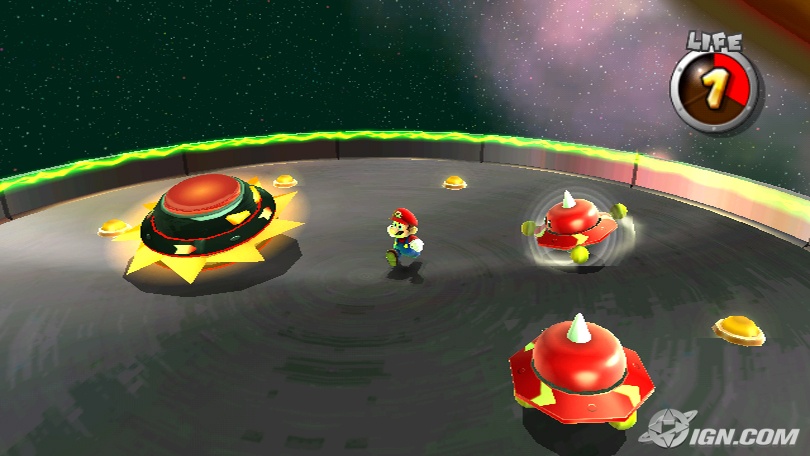
I could never quite tell from the YouTube previews, but it appears Mario’s using something like stencil shadow volumes to handle all its shadows– which are always projected in gravity’s direction. Unfortunately this technique means unsmoothed edges and a uniform brightness for all shaded areas. Side effects include moving platforms whose shadows suddenly blink onto surfaces when they approach, and suddenly disappear as they pass.

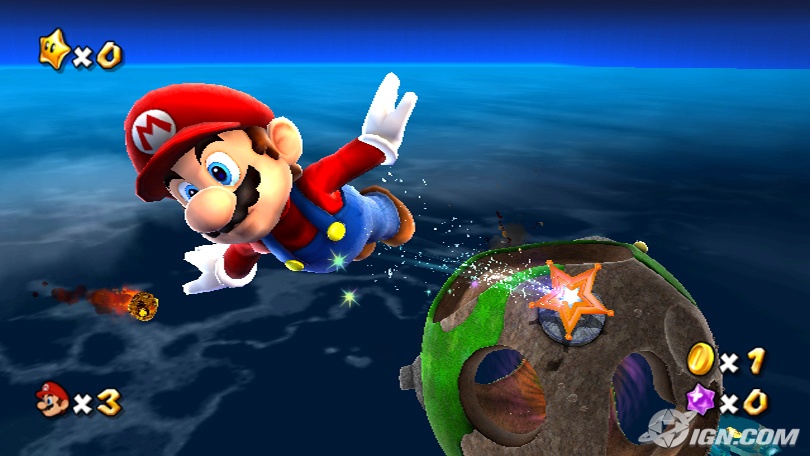
An element that Galaxy uses all over the place to great effect is something like a fake rim lighting shader. From what I understand, the Wii isn’t fragment shader capable, so maybe they’re faking it by setting an independent directional light aimed reverse relative to camera for each rimlit object? I’ve read a few things about the Wii’s Register Combiners and TEVs, and I wonder if they’re using them for pixel shadery purposes.

It’s all that lighting around the silhouettes of objects that helps give the characters and environments that signature plastic pop.

The fur shading is fairly nice as well, and I wonder how they’re doing it on the Wii hardware, whether it’s an actual shader, or they’re doing tricks rendering a multilayered shell of increasingly translucent polygons like in Shadow of the Colossus

Anyway, I am really enjoying the game so far, and the art direction is top notch. It’s also great to play Mario along to a live orchestral score — too bad Nintendo didn’t make the switch in time for Twilight Princess.

The shadows are the only real graphical let-down. It seems like they could be doing something more clever with the alleged crazy fill-rate on the Wii. Blurred textured shadow maps for near geometry or something? Also, multisampling would be nice, but playing on a standard def tv is forgiving.

I’d love to hear other people’s insights into the graphics behind the game. The rim lighting shading is something that could be easily applied to indie games looking for some eye candy punch…

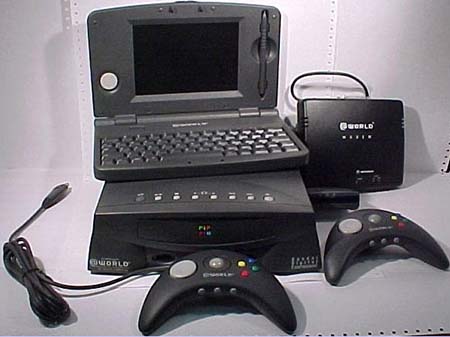
Apple Pippin: Ahead of Its Time and Doomed Even Before the CD-ROM Booted


“We think that Pippin represents the Next Generation of a lot of the things you’ll be seeing from Apple”.

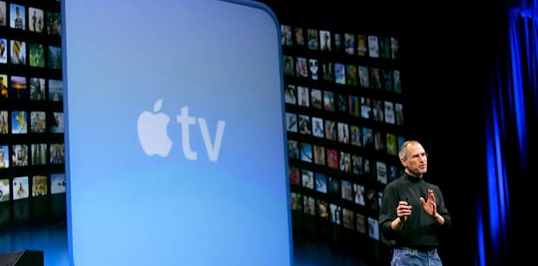
That is eerily prophetic, as the parallels are clear between the Pippin and the Apple TV, and more so with the more widespread contemporary trend of the set-top media box.

And from a developer’s standpoint, this promotional video highlights a lot of the the same things that Steve Jobs extolled during the iPhone introduction — It’s running the full version of Mac OS! Development is easy!

However the parallels between the Pippin and the 3DO are also easy to draw, and it’s easy to see why the system failed.

A third party, Bandai, manufactured and marketed the device. It was developed in the pre-NeXT acquisition mid 1990s, a grim time for Apple. To start the device, you had to insert a system disc into the 4x CD-ROM drive and wait for a streamlined version of Mac OS System 7 to boot. The graphics were all done in a PowerPC native version of QuickDraw, a graphics API that in its more than 20 years of existence, never supported more than a 1-bit alpha channel!

So many nightmares.

But the kernel of the idea was good. And it’s especially ironic today as the Xbox 360, Playstation 3, and Wii are all running on PowerPC architecture. The Pippin’s PowerPC 603e is the forebear of these consoles’ brains.

Watch carefully, and you will see the Pippin port of Bungie’s Marathon in the video — a game which you can now play on XBox Live Arcade. Here’s a full list of Pippin software releases. And more information including full hardware specs is available on the Pippin’s Wikipedia entry.

Good Games are Hierarchies of Attainable Goals

Kyle Wilson has written an insightful article called The Flow of Intentional Gameplay, where he picks apart survivalism and goals in videogames. He makes the case that good gameplay hinges on the player having readily identifiable goals at all times, and that games like Half-Life 2, and consoles like the Wii are successful because they are good at doing this.

Very interesting read. [via GameSetWatch]

The Frustration of Being a Third Party Facebook Developer

Back when Facebook’s much lauded platform API launched this past May, I wrote and released two apps. The first was a little screen saver for Mac OS X that grabs photos of your friends and creates a fun little Quartz Composer visualization. The second one was something I worked on with another guy I met in the facebook developers IRC channel.

It’s a little utility called Shortcut that allows you to very quickly jump to the profile, wall, or photo albums of any of your friends without an intermediate page load – kind of like an app launcher such as Quicksilver, except for your friends.

The second one lead to several webdev job offers I was totally unqualified for and a small but enthusiastic userbase.

So anyway, I woke up this morning and noticed that Facebook has added the functionality of Shortcut into their site-wide search bar, without so much as a courtesy e-mail. I suppose it was a fairly obvious idea, and the app itself used a feature provided by Facebook and most famously used in their photo tagging pages, so I can’t be that pissed… But I still feel a little swindled.

As an aside, I suspected Facebook might add this feature sooner, but figured they hadn’t because it would really slice into their pageviews. I guess this means it really is true that Facebook is more concerned with viewing time than page views, which is a great attitude for its users. Think about how many page loads it takes to do anything in MySpace.

Chicago iPhone Launch

While hanging out in Chicago this past Friday, I decided to check out the line at the Michigan Avenue Apple Store in anticipation of the dramatic 6pm launch of the iPhone. It was nuts: cops on Segways, restaurants handing out free food, and a line that stretched around the entire block.

I tried taking a few pictures on my crappy cellphone, but realized that I could probably get better results from the iSight in my MacBook Pro. So I ended up walking around, holding my machine up and attempting to capture the general pandemonium.


Around 6:15, I went across the street to a Starbucks to see what kind of stuff I’d managed to get, and quickly spliced it together into a little video in iMovie.

When I came out, everyone in line had already gotten phones, and I could finally wander into the store to try out some of the demo units on display.

I guess my thoughts echo those of most reviews. Really nice flashy interface, and my few minutes of trying to type ‘doomlaser.com’ into the touch screen made me want to destroy it.

Facebook Screen Saver

Facebook’s new public API has brought forth a lot of creative effort from external developers, but there haven’t been many desktop applications released to take advantage of its power.

So I thought, what better way to do something fun with the platform than write a MacOS screen saver?


Friend Photos finds pictures of your facebook friends and turns them into a dynamic slideshow.

It makes use of Quartz Composer in much the same way as the Apple TV’s famed screen saver, passing a data structure full of photos and metadata gleaned from facebook into a QC patch and moving them around for dramatic effect.

Let me know if you have any issues, clever presentation ideas, or what have you.

Update:

I’ve written about the creation of this screen saver, along with the early days of the Facebook API, and Facebook’s own embrace of Quartz Composer over here, if you’re interested.