
Cursorcerer: Hide Your Cursor at Will
 Cursorcerer is a little tool I hacked together which allows you to hide the Mac’s cursor at any time by use of a global hotkey. It can also autohide an idle cursor and bring it back as soon as you move the mouse.
The inspiration for this tool is one of my favorite and most utilized macOS features: the control-scrollwheel zoom trick. I use it all the time to make things like embedded web videos full screen. The trick’s only major downfall is that it’s a constant battle to get the cursor out of the way.
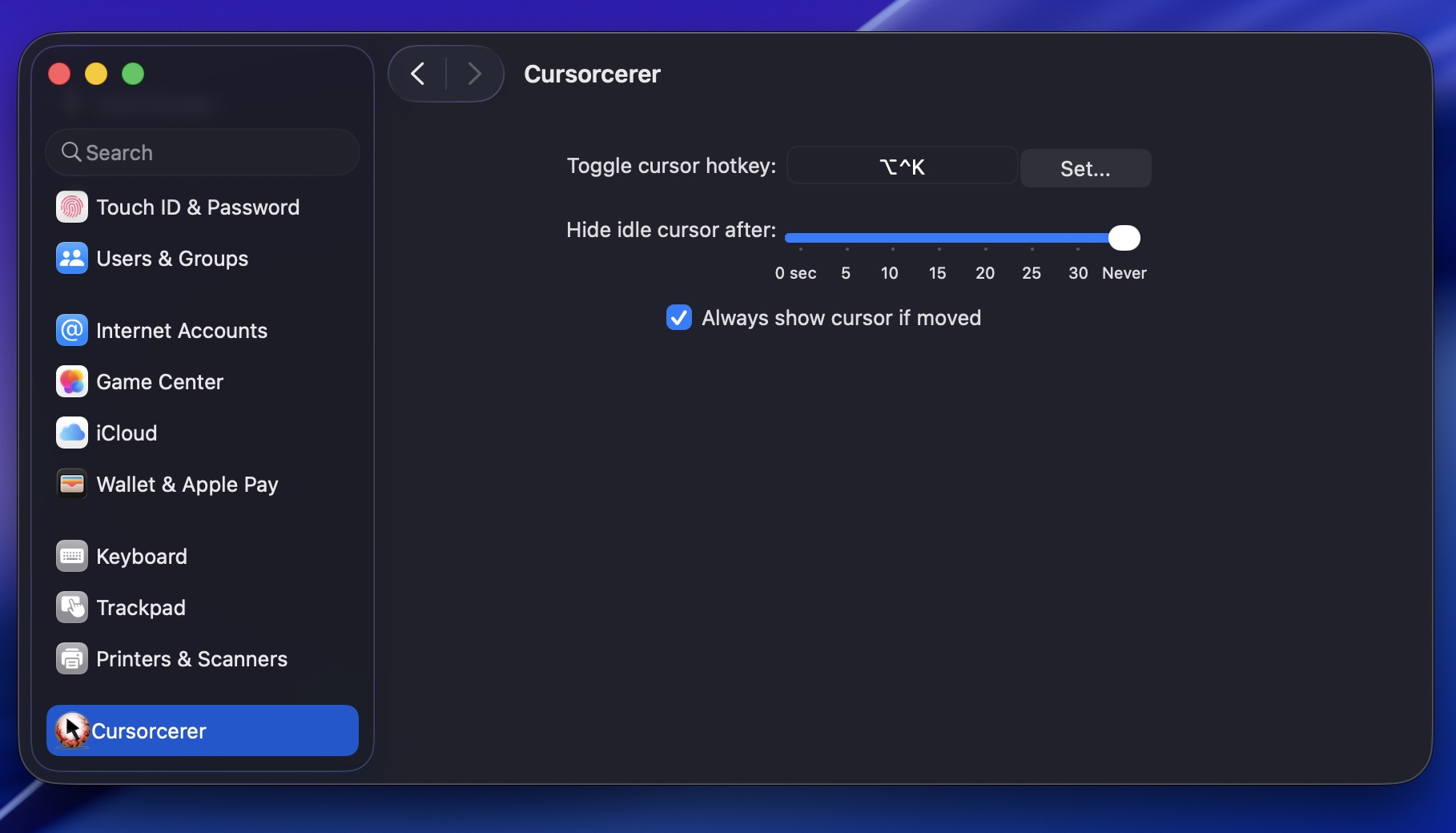
To install, just double click on the prefpane. Hit control-option-k to zap and unzap the cursor. If you want to uninstall, go to ~/Library/PreferencePanes/ and trash Cursorcerer.
The technique behind this global cursor hiding hack originates in a useful post to the Apple carbon-dev mailing list from Red Sweater’s Daniel Jalkut.
Cursorcerer 3.5 is signed, notarized, and works in macOS Tahoe, Sequoia, and Sonoma—and now natively supports Apple silicon Macs as well as Intel-based Macs. Legacy users can grab the 32-bit version here, or 2.0 here.
Download Cursorcerer 3.5
If you use Cursorcerer, please consider supporting it with a PayPal donation, or say hi on Twitter.


July 19th, 2026 at 7:48 am
cool now I can play lsd dream emulator in peace
November 30th, 2025 at 10:28 pm
Very nice tool, thank you very much for this!
Just one suggestion though: I’m on MacOS Tahoe and whenever I hide the cursor with this tool, as soon as I click the screen, either by tapping the track pad or force touch it, the cursor will appear again, causing me to have to press the control-option-K again to hid the cursor, can you please fix this?
Again, thank you very much!
November 20th, 2025 at 5:04 am
Oh my God, you are a life saver! What a great tool, thank you so much!
September 18th, 2025 at 2:49 pm
Thank you for this excellent app. I was already losing hope when I found this app. I had tried various keyboard combinations suggested online, but nothing worked except this app.
April 16th, 2025 at 5:36 pm
Awesome, a simple hotkey toggle to banish the stuck cursor I get with CrossOver. And you kept it up to date with Apple Silicon as well, excellent.
March 7th, 2025 at 4:33 pm
THANK YOU SERIOUSLY SO MUCH!!! I was about to have a break down trying to fix this issue so i could do some animation work in time for a deadline. You rock.
January 17th, 2025 at 11:17 pm
wow this saved my sanity. I have 2 macs connected by Sharemouse which shares the mouse/keyboard and it will leave another cursor hanging on the second monitor that i use for videos and tutorials. this is amazing and a game changer. thank you, you are doing great work with this little prefPane app! i’m amazed!
May 8th, 2024 at 10:04 am
Thank you so much! Worked like a charm with Sonoma 14.4.1 & M1 Pro. Finally a fix for Goodnotes with Wacom.
November 18th, 2023 at 11:39 am
What a great little utility. I bow down to you good Sir!
November 8th, 2023 at 8:55 pm
I think AutoHideMouseCursor is the Windows equivalent. Good luck on the Windows side!
November 8th, 2023 at 11:27 am
I love using Cursorcerer on my mac but my employer made us switch to PC. Any chance this app would be available on Windows?
November 25th, 2022 at 7:48 am
Awesome tool, super easy to set up and works just great. Thanks a bunch!!
October 30th, 2022 at 6:17 pm
Great work, this app rules.
March 30th, 2022 at 1:41 am
I virtually never give money for free mini projects like this, but you’ve earned it. Still updating an app you hacked together over a decade ago? And it works flawlessly and immediately with virtually no setup? Amazing, bravo
December 2nd, 2021 at 2:55 pm
Hey, I just want to thank you for this little but amazing app. I’m a hobby programmer myself. When my financial status gets better I’m going to donate. Within 2 years for sure. Thank you again for your support and work mate. PS: I have just bought the MacBook Air m1 and am very satisfied with it. And this little program is just what I need. Bye
September 6th, 2021 at 10:00 pm
been using for years. always been amazing, and so convenient to have the cursor just disappear and i don’t have to think about it. for whatever reason it wasn’t working, so i came here to re-download it (it’s working perfectly now), and i ended up donating to the paypal to show my support. to the creator, thank you for fixing a problem so simply, and making it so accessible, and i think you are a kind person.
January 7th, 2021 at 9:42 am
It’s amazing to see you as an individual developer updating your app 14 years after release. Truly astonishing.
December 2nd, 2020 at 3:00 am
The M1 version is done. Just download the latest version 🙂
December 2nd, 2020 at 2:55 am
Thank you very much for this app!
Will it work for the new M1 processor?
November 10th, 2020 at 4:09 am
This is my go to cursor hiding app for when I’m recording anything.
July 12th, 2020 at 10:05 am
Just what I need. Thank you very much!
October 12th, 2019 at 2:32 pm
works like a charm, very useful tool to replace a big absence
April 18th, 2019 at 2:06 am
[…] La dernière version du logiciel Cursorcerer pour macOS 10.11 et plus est à télécharger gratuitement sur sa page dédiée par ici. […]
December 28th, 2018 at 10:07 am
Perfect! I needed “something” that hid the cursor to create a handwriting animation with Photoshop, Quicktime and the Wacom tablet and this solution is for me. Thank you.
December 18th, 2018 at 8:37 pm
[…] option on Mac systems is using Cursorcerer Preference Pane which allows you to which allows you to hide the cursor at any time by use of a […]
April 28th, 2018 at 5:19 am
Thanks for updating this neat utility for 64bit!
September 8th, 2017 at 8:20 am
So happy i found this and it still works. I am not using the latest OSX but I hope you’ll keep this one around for the 64-bit era.
August 24th, 2017 at 12:28 pm
For some reason my mouse stopped disappearing on my mac and it irritated me so much! It used to do it so it was so annoying when it wouldn’t go away. this downloaded p quickly and i just set the keyboard shortcut and it works like a dream. Thanks!
August 9th, 2017 at 9:34 am
[…] störendes Element wahrnimmt. Ihr gehört zu eben jener Nutzergruppe? Dann könnten die beiden Apps Cursorcerer oder Mouse Hider einen Blick wert […]
July 18th, 2017 at 9:32 pm
Works great! Exactly what I was looking for, needed it for a program that accepts mouse input control, but the program doesn’t hide the cursor, so this was just what I needed to do that. Now I won’t be distracted by cursor movement again! Yay 🙂
July 11th, 2017 at 7:35 am
Awesome! Just what i was looking for! Works like a charm on MacOS X El Capitain 10.11.6, working with a Cintiq 27hdq (2017)
December 11th, 2016 at 1:41 pm
Works perfectly on macOS Sierra (10.12.1).
October 6th, 2016 at 1:17 pm
Cheers me dears! Just the job! Thank you
July 1st, 2016 at 4:27 am
Works great on El Capitan!
I don’t use it for videos, I use it to focus on reading PDFs in Preview.
Can you develop a CMD+OPTION+CONTROL shortcut? (“MouseHider” has it)
May 12th, 2016 at 1:56 pm
You’re the best man – Thanks a LOT and thank goodness it works great in El Capitan .. much apprec!
April 25th, 2016 at 10:27 am
Funny, I had an old version lying around. Stumbled on it today and ok I’ll download and try the latest version instead (2.0). But it didn’t work (crash on launch pref pane). So I tried the older version I have (file dates may 2014) and it worked. I have OSX 10.8.5. Anyway. seems like a nice solution. I magnify the cursor because my vision sucks (after a TBI) and often I search the screen to find the default cursor, which is waaay too small and unnoticeable. But then oftentimes it just hide important info (button text, popup helps, etc. Hence this seems like a good usability improvement for those cases. Thanks!
September 18th, 2015 at 11:44 am
I’ve been trying to screen capture a Unity game animation, and of course the cursor is in the middle. This should work nicely. Thank you
June 28th, 2015 at 7:52 am
Great little tool. Thanks!
June 12th, 2015 at 6:03 am
This little tool solved the annoying Photoshop problem where minimizing the Brush Tool over a certain point makes crosshair appear. Thank you so much for this!
May 28th, 2015 at 5:49 am
Hello this does not seem to work in Photoshop CC 2014. OSX Yosemite. I have set a few different keystrokes in the pref pane and the cursor is still visible regardless of how I set my cursor prefs within Photoshop. Ami Doing something silly?
May 18th, 2015 at 4:19 pm
I used it to hide the on a Touch Screen installed on a Mac Mini. Awesome, and free! 🙂 Thank you!
May 17th, 2015 at 4:21 am
Thanks. Perfect for getting an enlarged mouse pointer out of the way so you can see the help text underneath. Using Yosemite.
February 21st, 2015 at 5:47 pm
Not working. Crashes prefs-pane when I click on it. Tried rebooting, still crashes. Mountain Lion.
January 20th, 2015 at 6:40 am
Thanks so much! Now I can view Netflix without the cursor, at last! 🙂
November 16th, 2014 at 6:55 pm
WOW!!! thanks much..perfect!!!
as for not being active at reboot…
a little applescript in the startup folder..works a charm!!!
tell application “System Preferences”
activate
set current pane to pane “Cursorcerer”
end tell
October 11th, 2014 at 12:26 am
Brian Y +1
Update please!!!
September 9th, 2014 at 10:14 am
This is excellent! I was using WINE to run an old game, but the game would show a cursor over the HUD, so you couldn’t aim well. This let me hide it and get some nostalgia flowing! Thanks!
May 30th, 2014 at 5:50 pm
Thanks man,
This is perfect for iTunes 10 visualiser.
Cheers
May 25th, 2014 at 7:36 am
DOESNT HIDE ON DOCK!!! :'(
March 20th, 2014 at 4:55 pm
Thanks for creating this! I’m using it but I’m running into reliability issues on OS 10.9. I created an automator app that launches Cursorcerer.app, pauses a few seconds, then simulates the Command+Option+K key presses to hide the cursor. The automatic timeout does not work unless I go into the preference pane and move the slider.
It’s been many years since there was an update (maybe there was only the initial release). Would you mind releasing the source and posting it on Github? It would be great if someone could update this app for the newer versions of Mac OS and maybe add in some command line access so it can be scripted.
March 16th, 2014 at 4:26 pm
Absolutely great! 64 bit would be so amazing!!!
January 24th, 2014 at 6:26 pm
Doesn’t look like it has worked since OS X 10.8.3 like Mavericks, etc. Any plans on upgraded or supporting it for newer OS’s?
October 16th, 2013 at 6:28 pm
Hey, LOVE THE PROGRAM!!! but is it possible to make it so the cursor is just barely visible? like a TINY dot on the screen or maybe transparent?
October 12th, 2013 at 11:27 pm
This is perfect. Simple and elegant. Thanks heaps.
September 9th, 2013 at 11:49 am
Absolutely brilliant! Thanks so much!
August 27th, 2013 at 10:42 pm
Hi! This program is a life-saver for presentations. Thanks!
August 17th, 2013 at 11:58 am
Perfect. Thank you.
Jeff
July 24th, 2013 at 1:37 pm
This is what I wanted.
It’s like, I imagined that soft, and you did it;
Thanks.
April 18th, 2013 at 10:40 am
Does this work with OS X 10.8.3? Trying it out with QuickTIme Player, iTunes & Safari and doesn’t auto hide mouse cursor. It worked in previous OS’s like OS X 10.8.2 I believe.
April 12th, 2013 at 7:54 am
Hi,
thank you for this tool!
Do you think you could make it applescriptable or even just have a command line tool? This would allow touch screen app developers to integrate it in their (our 😉 applications.
Thanks!
February 24th, 2013 at 10:50 am
YESSSSSSSSSSS!
Thanks!
February 20th, 2013 at 11:30 am
This still works in Mountain Lion! You sir, are a gentleman and a scholar.
I kinda hate myself for putting it that way but dammit I’m taking that phrase right back from the hipsters..
January 20th, 2013 at 9:00 pm
Thanks so much!! I really urgently needed something like that.
December 7th, 2012 at 8:39 am
Thank you for providing such a great little applet. This is fantastic for use with touch system configurations as there is no real need for a cursor in a touch interface kiosk.
March 15th, 2012 at 3:53 pm
Joining the chorus hoping for a 64-bit version! Love the app, does what it says on the box.
November 4th, 2011 at 10:07 am
Looking forward to a 64-bit version as well!
August 26th, 2011 at 2:18 am
sweet!! one thing though: it would be great for looking at pictures and videos or anything with universal access mouse scroll zoom, but the mouse won’t hide when zoomed…
August 24th, 2011 at 5:15 pm
Perfect fix for the Hulu desktop cursor bug!!!!! Thank you so much!!!!
May 3rd, 2011 at 8:56 am
I too would appreciate a 64-bit version! Thanks!
April 12th, 2011 at 10:42 pm
You are my hero! I am recording painting in Photoshop for an animation and now I can do so without the cursor getting in the way. Legend!
April 12th, 2011 at 8:50 pm
A 64-bit version would be soooooo appreciated!!
Thanks in advance!!
April 2nd, 2011 at 11:08 am
Yes! I’ve wanted something like this for a while. TY
February 26th, 2011 at 1:08 pm
Hi!
Nice tool. Thank you very much. Very usefull an very good idea.
It work perfectly.
Thanx again.
Greetings from spain!
January 29th, 2011 at 3:03 pm
Would love to see a revival of this app. Just found it and it works great. I think a few things would be the ability to always hide cursor all the time in certain apps, like Boxee. 🙂
December 24th, 2010 at 1:51 am
Thank you so much!!!! I love it. I was always irritated about the mac cursor getting in the way in full screen modes. The only issue that I’ve found so far is that on Snow Leopard, the pref pane keeps wanting to restart once, every time you try to open it.
December 2nd, 2010 at 7:08 am
Hi,
Would you consider releasing Cursorcerer under GPL? I’d love to fix autostart and disable logging.
September 17th, 2010 at 9:32 am
Love it! thanks a lot!
August 23rd, 2010 at 8:59 am
Useful app… as you don’t appear to have time to address the initialization issues reported above and it remains a 32 bit application, any chance you would be willing to release the code to the public domain so it can be updated to be 64 bit Snow Leopard compliant?
Thanks regardless!
April 16th, 2008 at 2:30 pm
1) I like your application, it’s very handy!
2) I hereby file a BUG REPORT.
SETTINGS in my System Preferences Tab:
Hide idle cursor after: NEVER
Always show cursor if moved: FALSE
BEHAVIOUR
If I set it like this the program works correct, also after awaking from a system-sleep, but after the next reboot, Cursorcerer forgets its adequate behaviour, although the settings at com.doomlaser.cursorcerer.plist look correct.
WORKING ENVIRONMENT
MacOSX 10.4.11 + Cursorcerer 1.0
Please fix this! You can contact me via email. Please keep my address really private (as you promised next to the form).
April 16th, 2008 at 2:02 pm
Great little app!
Want to report a little bug:
Hide idle cursor after: NEVER
Always show
March 2nd, 2008 at 7:56 am
Great little app, just one comment, do we really need to fill the console log with these lines?
2008-03-02 14:50:28.833 Cursorcerer[212] HIDING IDLE CURSOR!
2008-03-02 14:50:30.233 Cursorcerer[212] SHOWING CURSOR! autoShow: 1
etc…
etc..
etc.
February 28th, 2008 at 2:35 pm
I’m with Jack – getting it to function in Photoshop is my number one wish. Just got my Modbook also, and if the pencil cursor could be eliminated… I’d have to do a little dance.
February 4th, 2008 at 11:04 am
I can’t seem to get it to work using Photoshop, which is what I really wanted this app for. Any reason why PS seems to thwart Cursorcerr.
February 1st, 2008 at 4:20 am
Brilliant app thingy! Thank you very much! ^_^
January 22nd, 2008 at 12:05 pm
FANTASTIC application. But I am running into the issue with reboots. After a reboot on a Tiger machine the cursor doesn’t hide until I go into the cursorcerer pref panel and click on the timing slider.
January 19th, 2008 at 5:49 pm
Hi,
I’ve been looking for a way to look at those flash embedded movies without my cursor being in the way (as you described)
just perfect! thanks for the tool!
grtz,
Julien
January 17th, 2008 at 4:21 pm
I also wish it would stay active after reboot. I keep forgetting I have it installed, which sucks, cos this is otherwise great.
January 16th, 2008 at 8:58 am
Hello:
Just trying your utility with a ModBook Mac (tablet mac) that I just received. It’s great because it allows me to forget that there is a slight offset of the pen. I have a request to keep the cursor hidden at all times as well as one to allow the utility to work after a reboot, without having to go to the control panel.
Great job.
Thanks!!
January 13th, 2008 at 5:28 am
I use a mac mini with keynote as a player and hide the menubar with menu bar tint (http://www.manytricks.com/blog/?id=21). By making the menu bar black it only shows up when I move the cursor above it. Every nigh I do a reboot for my system, but after a reboot the cursor is always on the left up corner, and Cursorcerer doesn’t work yet, I first have to click on the prefernce panne to activate it? “”What I need for a perfect presentation machine is Cursorcerer to hide the mouse after a reboot.””” Or a script witch moves the corsor after a reboot? Maybe I can activate Cursorcerer with the login pane.I would be very happy with a tip.
December 9th, 2007 at 1:17 pm
Hey I love Cursorceror, I have it set to disappear after 3 seconds. But when I reboot, it doesn’t do it anymore until I go into the preference pane and alter the timing slightly to 2 or 4 seconds.
Is there a way to have it permanently automatically hide after 3 seconds, and last through reboots, without ever having to go back into the preference pane?
December 4th, 2007 at 12:12 pm
You rock! May your ancestors smile upon you and the Fates be most kind to you. Hiding the mouse cursor is a great service to MacManKind.
December 3rd, 2007 at 11:58 pm
I’ve been looking for this for a long time. Thanks!
December 3rd, 2007 at 10:22 am
I love Cursorcerer, the best mouse app on mac os x.
October 26th, 2007 at 8:29 am
Somehow or another I have turned into the go to tech guy everytime we start a new season of Between the Lions. After finding this golden nuggett of tech lovelyness I wont be waiting but sending it to all of the cast and crew. Wow! Big big thanks.
anthony
aka
“Lionel”
Between the Lions
October 15th, 2007 at 12:45 am
i am not worthy …
may your guinness never be headless or empty.
tanx, man.
October 8th, 2007 at 1:41 pm
Wow, I absolutely LOVE this, but I find that no matter how many seconds I set it for, the “Hide Idle Cursor After:” setting hides the cursor after a random amount of time, usually around 15 seconds, sometimes more, sometimes as little as 8! Other than that one little quibble, though, this little add-on is the absolute BEST, and I think we should all nominate it for the upcoming MacWorld Reader Awards!! Write to: Philip Michaels pmichaels@macworld.com to nominate it!
October 4th, 2007 at 8:05 am
thanks for a great product.
September 27th, 2007 at 4:18 pm
Bas :
I have the same problem on one machine. The hot key toggles, but the cursor does not obey the “Always show cursor if moved” setting. Intel Mac Mini. In my case I am loading DVD Player at login. I wonder if the cursor hiding in DVD Player is interacting with Cursorcerer.
September 27th, 2007 at 12:25 am
Cheers for this!
I’ve written a script to autoload a QuickTime on startup, and go full-screen (for a video screening in an exhibition space).
Previously, half the time the cursor vanished, half the time it hung around. Irritating.
With this however, the little bugger is out of sight for good 🙂
September 12th, 2007 at 12:15 am
Thanks this is a big help to me, just last Friday night I was showing zoomed video on a big screen and annoyed at the damn mouse pointer.
FYI: Minor possible bug: after install I opened the preference pane and in the hot key window it said “ctrl-option-k.” I then exited system preferences and tried the hot key combo; it did not work. I went back to the preference pane and this time the hot key window said “??K.” I exited preferences & this time it worked.
September 11th, 2007 at 11:14 am
Actually, as a further comment—I’d like to recommend a keystroke for people to use. The “clear” button on the number pad. Not sure what this key does in Mac OS X; it doesn’t seem to clear anything at all. Macbook users can access this with Fn+6. If you are like me, then you like your keyboard shortcuts to make sense, and I can think of nothing more fitting for the “clear” button than to make the mouse disappear.
September 11th, 2007 at 11:03 am
I too have been looking for this for a long time, but could never find anything through message boards or googling.
1) Get the word out there! Other people might not know what search terms to use either.
2) Add a donate button. This is worth $5 to me, and maybe to some other people.
September 11th, 2007 at 4:23 am
It doesn’t stick… For me… I need to activate the control panel AND click on the slider to have the functionality restored… It then works some time… Not sure what makes it stop. But it doesn’t survives restarts…
if it would do that too it would be perfect…
i have al the latest and gratest os updates
September 8th, 2007 at 1:37 am
At last! I found the great solution! Thanks a lot!
August 29th, 2007 at 3:31 pm
The ability to toggle this via an AppleScript would be awesome. I control Apple’s DVD Player with AppleScript to be full screen and turn off the controller. To also hide the cursor would be Sweet.
August 6th, 2007 at 8:23 am
You have answered my prayers. I’ve wanted this for a LOOOOOOONG time, now when I put my wacom pen back in its holder to type, the cursor disappears after 3 seconds.
YOU ARE THE SHIT!
July 22nd, 2007 at 12:33 am
just wanted to say thanks for this, it works amazingly well!
July 13th, 2007 at 12:55 am
Yea!! I, too, am always trying to manage getting the most zoom with my cursor being just below the movie .. and now you’ve solved it! Bravo!!
I don’t see a paypal link here to chip in beer money. Consider it!
July 11th, 2007 at 1:50 am
Kudos for this one, some people suggested that tapping any key while zoomed in works just as well, but it won’t and never has for me afaik so your implementation seems to be the sole solution to this issue. Thanks!
July 10th, 2007 at 6:56 am
Thank you very much. I’m using this with my MacMini on my HD TV.
July 10th, 2007 at 3:18 am
Nice! I can also see this being useful when using other full screen video apps, VLC, Democracy, etc. The cursor is always in my damn way.